How we picked
We included tools that redraw a face, a scene, or a video in an anime style, not a color grade or a sticker overlay. Then we ordered them by how well they match the most common intent behind "anime filter app", using four criteria in this order:
That ordering puts PixVerse first, Viggle second, LiveGen third, and Akool fourth. If your intent is live camera rather than "an app for my selfie", read the list from the live column of the comparison table instead of from the top.
How we verified pricing: we opened each vendor's pricing page on September 21, 2026 and copied the numbers shown. We did not use review sites or resellers. Prices change and promotions rotate, so treat every figure as a snapshot and confirm on the vendor page before you pay.
Live anime filter vs generated anime video
Before you pick a tool, it helps to know which of two jobs you're actually doing, because the best anime filter app for one is the wrong choice for the other.
A live anime filter transforms your camera feed as it happens. You point a webcam or phone at yourself, and the tool redraws you, or your whole scene, as anime while you talk, blink, and move. Frames are generated as a continuous stream while the input is still happening, so you see the result immediately and can fix framing or lighting on the spot. The output is something you can stream, take on a call, or record in one take. The real-time anime filter explainer walks through how that works, and the behavior itself is what we call live morph.
An upload or prompt tool works in batches. You hand over a photo, a clip, or a prompt, a server renders every frame offline, and you get a file back afterward. Any change means another render. The trade is honest in both directions: batch rendering can spend more time per frame, so fine detail such as hands, small text, and fast motion usually comes out cleaner, while live generation favors responsiveness over per-frame polish.
On this list, PixVerse sits on the upload and prompt side, LiveGen sits on the live side, and Viggle and Akool do both: uploads as their core product, plus a live webcam feature. And if all you need is a single still, LiveGen's photo to anime converter handles that middle case.
Quick comparison
Pricing as of September 2026, from each vendor's own pricing page (URLs in the tool sections below).
| Tool | Live camera or upload | Platforms | Free tier | Starting price |
|---|---|---|---|---|
| PixVerse | Uploads and prompts (live camera input could not be verified) | Web, iOS, Android | Yes: 60 initial credits plus 30 daily credits, up to 540P, watermark removal listed only on paid plans | $10/month, or $8/month billed yearly ($96) |
| Viggle | Both: uploads, plus Real-Time Swap on a webcam | Web, iOS, Android | Yes: 5 free videos per day, watermarked, 5 min of Real-Time Swap | $9.99/month, or $7.99/month billed yearly |
| LiveGen | Live camera (plus one uploaded photo in Bring to Life) | Browser on desktop and mobile, no native app | Free to try, free exports carry a watermark | Metered in credits, see pricing |
| Akool | Both: uploads, plus Live Face Swap on a webcam | Web, plus the Akool Live Camera desktop app for Windows and macOS | Yes: $0 plan, full-screen watermark, 5 min of Live Face Swap | $12 per seat per month (200 credits) |
The tools
1. PixVerse
PixVerse is an AI video generator with a web app and native iOS and Android apps. You give it a photo, a clip, or a text prompt and it renders a finished video, and anime is one of the looks it offers among many stylized effects and templates. It ranks first here because it is the closest match to what "anime filter app" usually means: an app you install, a free daily allowance, and a result you can post.
PixVerse also has a newer real-time mode, R1, built on a world-model approach where the video keeps generating and responds to input during a session. We could not confirm from PixVerse's public pages that R1 takes a live camera feed, so we treat PixVerse as an upload and prompt tool in this comparison.
2. Viggle
Viggle is a character animation tool with a web app and iOS and Android apps. Its core job is mapping motion onto a character: you upload one character image, pick a motion template or a source video, and it renders that character performing the motion. Anime characters are a common choice. It also has a live webcam feature, which Viggle's pricing page calls Real-Time Swap and its product page calls Viggle LIVE, that animates a character image from your webcam and, per Viggle, tracks facial expressions and whole-body movement.
Viggle is strongest when you want a full-body anime character in motion, dancing or acting out a meme, rather than a filter over your own face and room. For a side-by-side, see LiveGen vs Viggle.
3. LiveGen
LiveGen is real-time interactive AI video that runs in a browser tab on desktop or mobile, with nothing to install. Your camera streams to LiveGen's real-time engine and the transformed video streams back while you move. For anime there are two routes. Style Morph repaints the whole frame, you and the room, in an anime style, which is the AI video style transfer mode. Live Morph makes you appear as one specific anime character from a single reference image, with your expressions and movement carried over; that is Live Morph. In Studio you pick the mode chip, pick a preset or upload your own reference (JPG, PNG, or WebP, up to 10 MB), and press Start. The camera stays off until you do.
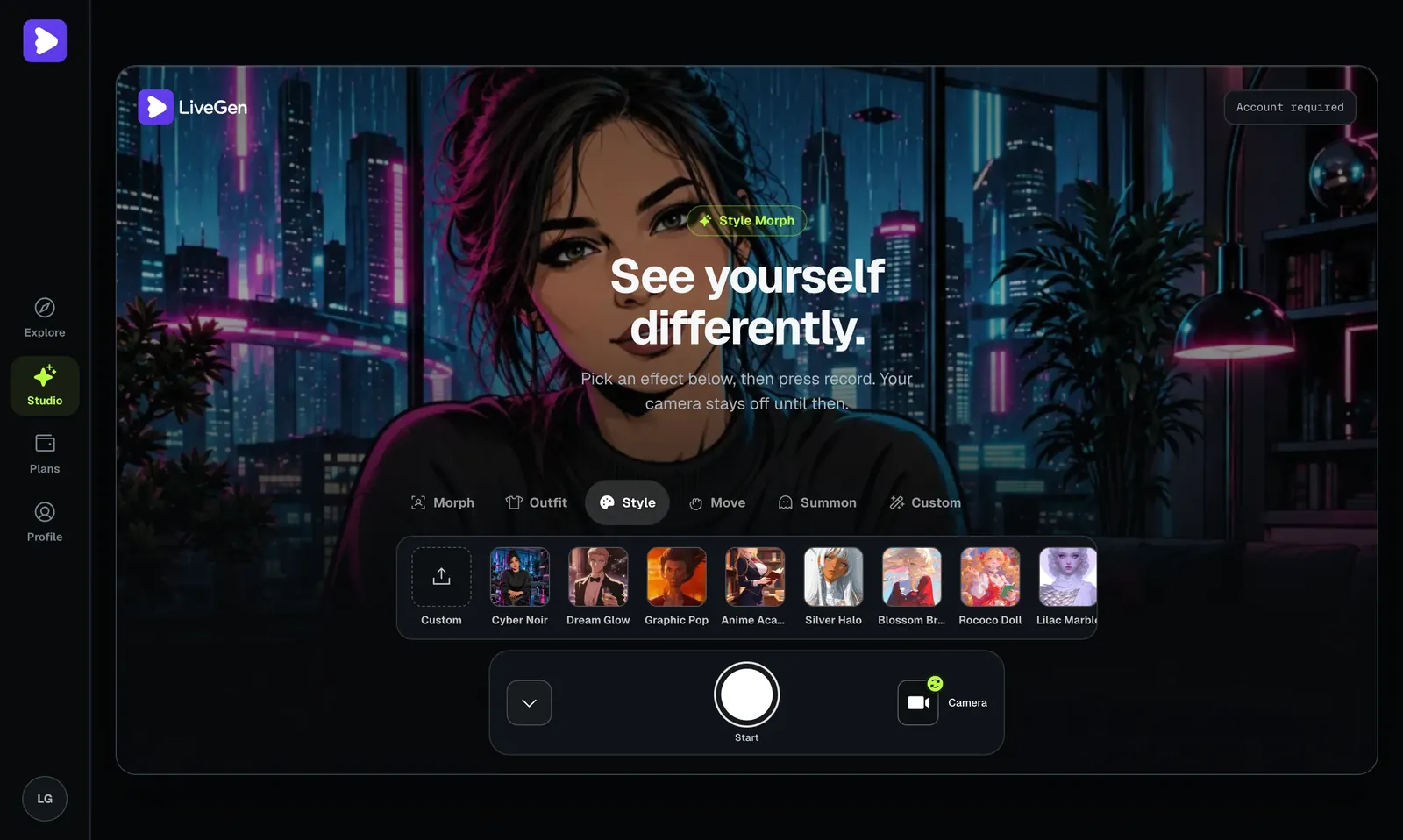
It ranks third because it is not what most people mean by "anime filter app": there is no App Store or Google Play app, and it is built around live camera video rather than uploading an existing clip. If live is what you want, it moves to the top of your list, and the quickest way in is the anime filter online page.
4. Akool
Akool is a broad AI video suite aimed at marketers and professional creators: avatars, video translation, image and video generation, and face-swap tools. The part relevant here is Live Face Swap, which Akool describes as swapping your face with another face in real time using your device's camera, from the web app. Akool also ships a separate desktop app, Akool Live Camera, for Windows and macOS, which replaces your feed with an avatar in Zoom, Google Meet, and Microsoft Teams.
It ranks last for this query because anime is not a mode in Akool. You get an anime result only by supplying an anime-style face as the reference, the effect covers the face rather than the whole frame, and the pricing is built for teams. If you're weighing it specifically against LiveGen, see LiveGen vs Akool.
What to look for in an anime filter app
- ✓App, browser, or desktop: If you want a home-screen app, only PixVerse and Viggle on this list have one. Browser tools work on any laptop or phone with no install; desktop apps tie you to one machine.
- ✓Live vs after-the-fact: If you'll be streaming or on video calls, confirm the tool transforms a live camera, not just a saved photo or clip. Plenty of apps marketed as an anime filter only restyle a still image.
- ✓Character-only vs full-scene: Decide whether you want to become an anime character while your real room stays put, or the whole frame, you and your background, repainted in an anime style. LiveGen's Style Morph is the full-scene live option on this list.
- ✓Reference control: The anime look usually depends on a reference character or preset. Tools that let you supply your own reference image give you far more say over which anime style you land on.
- ✓What "free" means: Check three things on the pricing page: whether free credits refresh or are one-time, whether free output is watermarked, and the resolution cap. All four tools here watermark or restrict free output in some way.
- ✓How usage is metered: Per-generation credits (PixVerse, Viggle, Akool) reward getting it right the first time. Per-second metering (LiveGen) rewards short sessions.
- ✓Consent and likeness: If you'll base a character on a real person, choose a tool with clear consent and content rules. Responsible use of a real person's likeness needs permission, and reputable tools moderate uploads for exactly this reason.
How to choose
- ✓Want an app on your phone that turns a selfie or photo into an anime clip for free: PixVerse.
- ✓Want a full-body anime character dancing or acting out a meme: Viggle.
- ✓Want to be an anime character live on your own camera, in a browser, right now: LiveGen, with Live Morph for a specific character or Style Morph for the whole scene.
- ✓Want a live face effect inside a larger professional video toolkit: Akool.
- ✓Want the most polished single clip and don't mind waiting for a render: an upload tool (PixVerse or Viggle), not a live one.
- ✓Making short-form clips for TikTok or Reels: either side works. A live tool records the transformed feed in one take, which suits AI video effects for TikTok; a generator suits a scripted scene.
- ✓Adding an anime look to an existing broadcast setup: read how to add effects to your live stream for the routing side, then pick a live tool from this list.
If you're still torn, start with the job, not the brand: a live transformation for anything you'll stream, call, or record on the spot; an upload tool for a polished clip you'll post later. For live avatar and character tools more broadly, our best live streaming avatar tools roundup goes deeper on that category.